
Search your own stock the way a dealer searches a parcel.
Every piece, every stone, every location — with carat, colour, clarity, cut and shape as filters rather than notes. Because jewelry inventory is not a quantity on hand, it is a thousand individual things you need to find.



What is Jewelia Inventory?
A stock system that knows what a stone is
Most inventory software was written for shops that sell twelve of the same thing. A jeweler sells one of each, and the thing that makes it findable is not a SKU. Jewelia is jewelry inventory management software for finished pieces, loose stones, watches and raw materials, searched the way a dealer searches a parcel.
A SKU cannot describe a stone
What it costs youThe system knows "ring, gold". The buyer needs 1.02ct, G, VS1, excellent cut, none.
How Jewelia solves itEvery item carries carat, colour, clarity, cut, fluorescence, metal and certificate, searchable by range like a dealer's parcel.See how
The count on screen is not the count in the case
What it costs youSales, repairs and memos each adjust stock in their own system, and the stock book agrees with none of them.
How Jewelia solves itPOS, production and memo write to the same item record, so the number on screen is the number in the case.See how
Where is it, exactly?
What it costs you"In the store" is not an answer when there are three cases, two safes and a second location.
How Jewelia solves itLocations down to a case or safe, with transfers between stores logged and labelled.See how
Memo goods counted as your own
What it costs youSupplier pieces in the case inflate your valuation and your insurance.
How Jewelia solves itGoods held on memo tracked separately from stock you own, on the same screen.See how
Dead stock nobody flags
What it costs youPieces that have not moved in a year hide inside a healthy total.
How Jewelia solves itAging by category, with Jewelia AI listing what to mark down or move — once you approve.See how
Pieces, not quantities
A general system counts twelve of a SKU. Yours are one-of-a-kind, each with its own metal, stones, cost and location — so every piece is tracked as itself.
The 4Cs are fields, not notes
Carat, colour, clarity, cut, shape and fluorescence are searchable attributes, so you can filter your own stock the way a dealer filters a parcel.
Down to the safe and the case
Stores, vaults, safes and display cases — with transfers between them and a movement history that says who moved what, and when.
A number you can bank on
Total stock value live on the screen, cost and retail per item, and a replacement valuation at today's metal spot prices when the insurer asks.
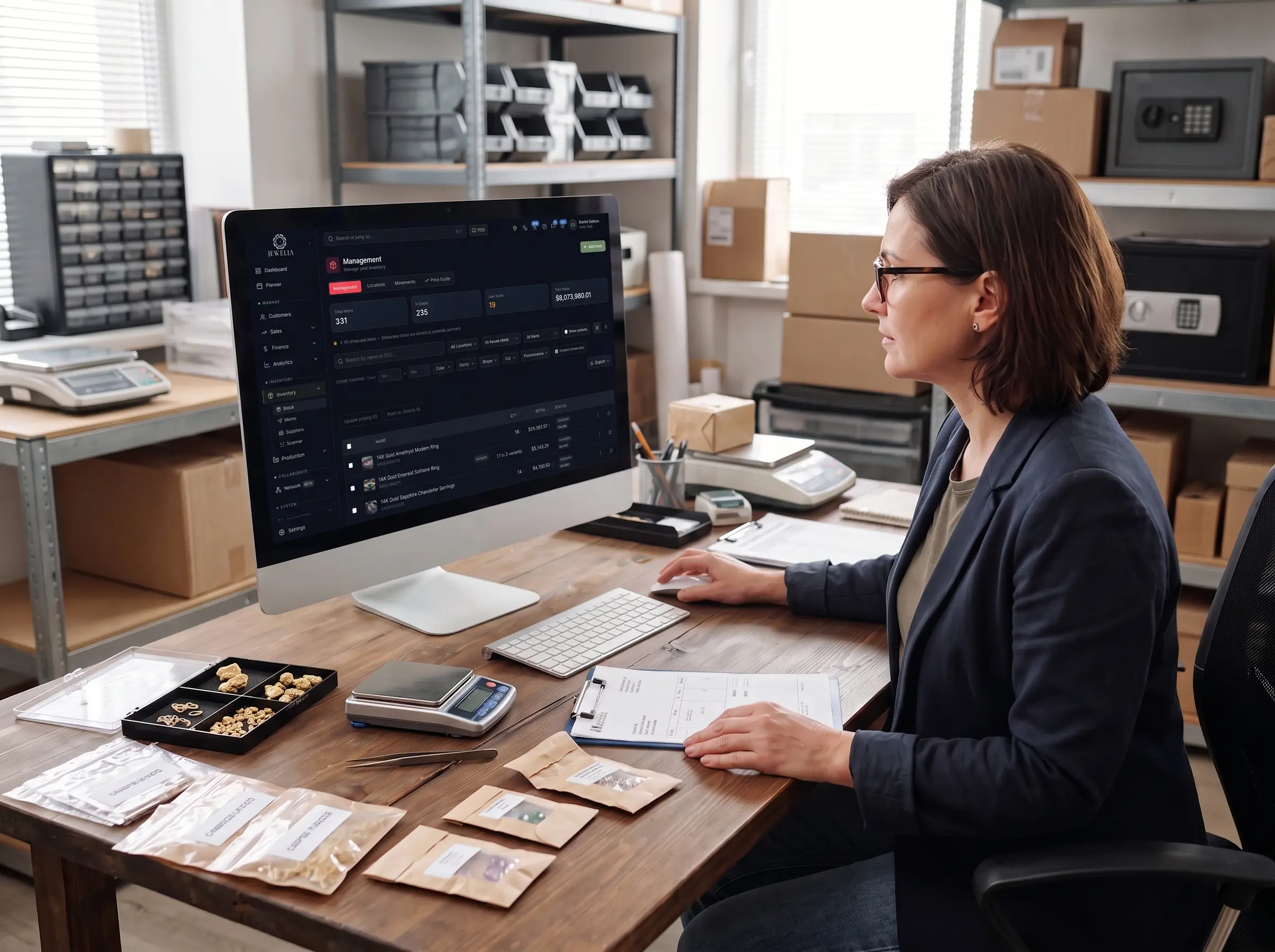
Stone grading search
“0.90 to 1.20, G or better, VS2 or better, round.”
Ask a general inventory system that question and it has nowhere to look, because the 4Cs live in a description field. Here they are filters — so the answer comes from your own stock in seconds, while the customer is still standing there.
Combine them with location, your own categories, and in-house versus consigned — then export the result or update the whole selection at once. And because memo goods stay separate from stock you own, you know before you quote whether the stone you just found is actually yours to sell.
On every item
The fields the trade actually trades on
Jewelry inventory software earns the word “jewelry” in the item record. These are the fields that make a piece costable, insurable, findable and sellable.
Metal
Type, karat, weight and fineness on every piece, so scrap value and costing are computed rather than guessed.
Stones
Cut, colour, clarity, carat and origin, for stones set in a piece and for loose goods in a parcel.
Certificates
GIA lookup by report number pulls the grading in; AGS and other certificates attach to the item.
Bill of materials
Components, findings and stones that make up a finished piece — the basis for real costing and for production.
Images & variants
A photo on every row, and variants where a design genuinely comes in sizes or metals.
Four views
Stock, where it is, where it went, what it’s worth
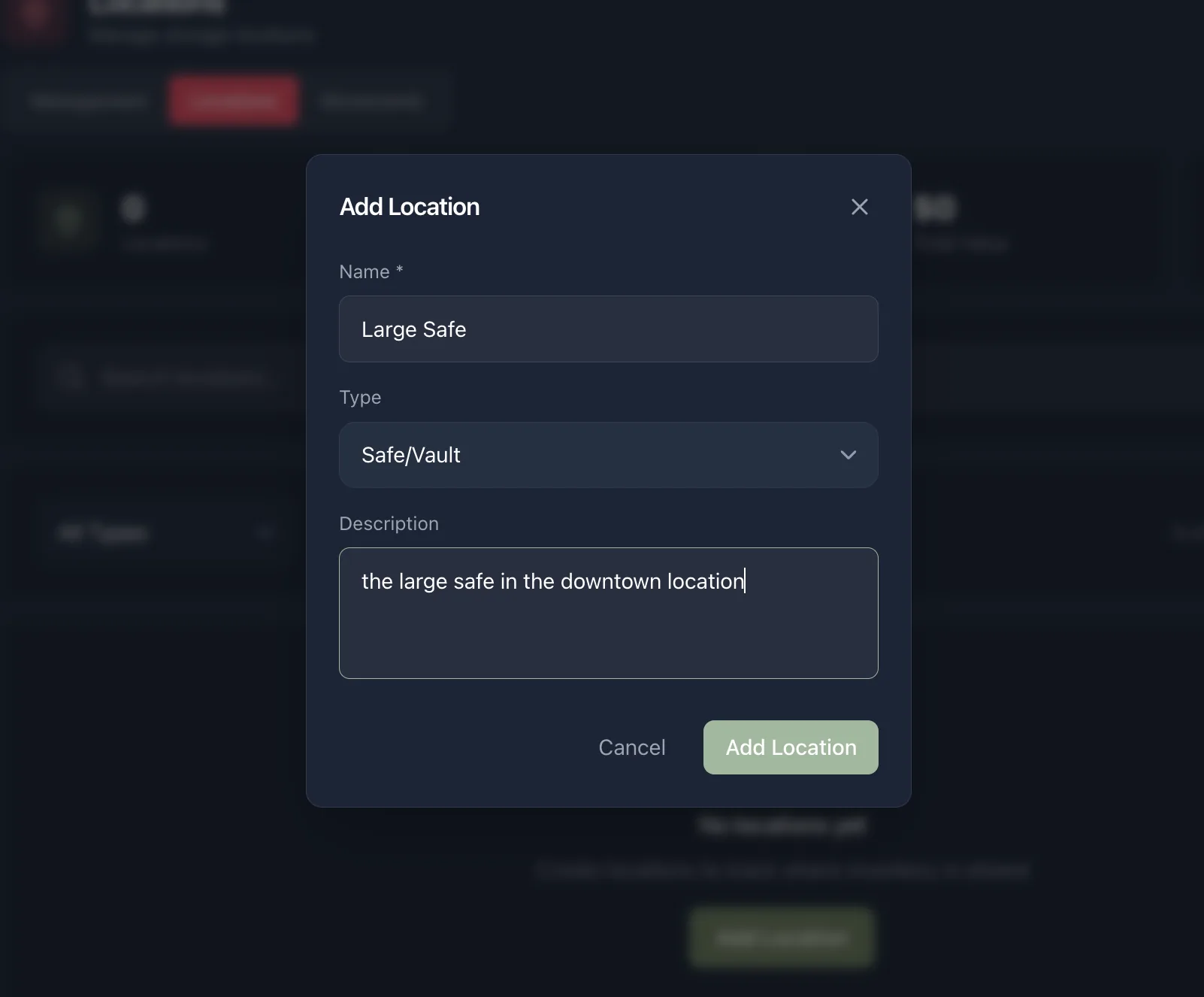
Multi-location inventory management, at the granularity a jeweler actually works in — a store, a vault, a safe, a single display case.
Management
The whole stock list with search, filters, images, cost and retail, and bulk actions — update pricing or push to Shopify across a selection.
Locations
Multi-location stock across stores, safes, vaults and cases, each with a type and a description, so “where is it” has an answer more precise than the building.
Movements
The audit trail. Every transfer between locations, with what moved and when — which is what turns a stock discrepancy into a question you can answer.
Price Guide
Market pricing reference alongside your own stock, so buying and quoting decisions are made against current numbers.
Any USB or Bluetooth barcode scanner works, and Jewelia prints the price and repair tags with barcodes that make the scanning possible.
Why general stock software struggles
Four assumptions that don’t survive a jewelry safe
Quantity on hand is the wrong question
Retail inventory software is built around “how many of these do we have”. In jewelry the answer is almost always one, and the useful questions are which one, where it is, what is in it and what it cost — none of which a quantity field can answer.
It cannot search a stone
Ask a general system for every unmounted round brilliant between 0.90 and 1.20 carats, G or better, VS2 or better, and it has nowhere to look. Those are text in a description field. In Jewelia they are filters.
It counts stock you don't own
Goods held on memo from a supplier sit in your safe but are not your asset. A system with one stock pool either overstates your inventory value or hides sellable goods. Jewelia separates in-house stock from consigned.
A location is not an address
Most systems model a warehouse. A jeweler needs the main case, the bridal case, the back safe, the repair drawer and the piece that went to the show on Friday — and a record of every move between them.
Beyond a stock list
Six jobs a spreadsheet cannot do
Knowing what you are insured for
Total stock value is on the screen, and the replacement valuation report prices your inventory at today's metal spot rather than at what you paid two years ago. Under-insuring a jewelry business is an expensive habit that usually starts with a stale spreadsheet.
Finding the dead stock
Aging and turnover by category show which part of the case is working capital and which part is decoration. Most jewelers are surprised by how much of the floor has not moved in a year, and by what the cash tied up in it could have funded.
Counting without closing
Barcode scanning turns a stock count into scanning rather than reading, and any USB or Bluetooth scanner works. Print your own price and repair tags with barcodes so the scanning has something to read.
Selling stock you are not holding
Give a dropshipper or stockist a read-only Partner Portal view of the items you choose. Nothing outside that selection is visible.
Reordering before it is embarrassing
Low-stock alerts with reorder points per item or category, for the chains, findings and staples where running out is a lost sale rather than a design decision.
Getting it in from wherever it lives now
Import it yourself with the guided wizard, or send us the export from whatever you run today and we will load and clean it as part of onboarding — both on every plan. We will load an export of your inventory before you sign, so you see your own goods in the system rather than a demo dataset.
One database
Your inventory is the spine of the whole system
Every other module reads and writes the same stock records, which is why a sale, a memo, a repair and a quote can never disagree about where a piece is.
Point of Sale
The piece leaves stock as it leaves the case — no nightly sync, no selling the one you just sold.
Memo & Ledger
Consigned goods are tracked separately from stock you own, so valuation stays honest in both directions.
Production & Repairs
A bill of materials draws components out of stock as a job consumes them.
Sales & CRM
Quotes are built from live stock, so nothing is offered twice or promised after it sold.
Partner Portal & Shopify
A read-only view for the partners you choose, and a Shopify store kept in two-way sync.
Analytics
Valuation, turnover, aging and inventory by location, as reports rather than as a manual count.
Partners on the Partner Portal see only the items you choose, never the rest of your book.
How much stock
Catalogue size is a plan setting
The same application runs a single workshop and an unlimited catalogue across hundreds of locations. You are not buying a different product as you grow, just a different line on the invoice.
Jewelry inventory software: questions
What is jewelry inventory management software?
Jewelry inventory management software tracks finished jewelry, loose stones, watches and raw materials using the attributes the trade actually trades on — metal type, karat and weight; stone cut, colour, clarity, carat and origin; certificate numbers — rather than as a quantity against a SKU. Because most jewelry is one-of-a-kind, each piece is tracked individually, with its own cost, location and history. Jewelia adds GIA certificate lookup, barcode scanning and tag printing, multi-location transfers with an audit trail, bills of materials and low-stock alerts.
How is it different from general retail inventory software?
General retail inventory is built around quantity on hand for repeatable SKUs. Jewelry inventory has to handle four things it does not: serialized one-of-a-kind pieces rather than counts, stone and metal attributes that are searchable rather than buried in a description, stock held on memo that sits in your safe without being your asset, and locations as granular as a single display case or safe. Everything else — receiving, pricing, counting — is broadly the same.
Can I filter my stock by carat, colour and clarity?
Yes, and this is usually the moment a jeweler stops comparing us to general software. Stone grading filters cover carat range, colour, clarity, shape, cut and fluorescence, with an option to show graded stones only — so you can answer “what do I have between 0.90 and 1.20, G or better, VS2 or better” from your own stock in seconds instead of opening a parcel book.
Can I track loose diamonds and finished jewelry in the same system?
Yes. Loose stones, mounted pieces, watches and raw materials each carry their own fields, and a bill of materials links components and stones to the finished item — so a stone can be tracked as loose goods, then as part of a piece, without being entered twice or lost in between.
Does it do GIA certificate lookup?
Yes. Enter the report number and the grading is looked up and attached to the item for GIA. Certificates from AGS and other labs can be attached to the record as documents, so the paperwork travels with the stone.
Does it include a diamond price guide?
Not today. Certificate data comes in through GIA lookup by report number, and you price against your own cost and retail. A Rapaport price guide integration is on the roadmap rather than in the product, and we would rather say so than let you find out after you subscribe.
Can I manage multiple stores, safes and display cases?
Yes. Locations are defined by type — store, safe or vault, display case — so stock is placed where it physically is. Transfers move items between them and the Movements view keeps the full audit trail, which is what makes a discrepancy something you can investigate rather than absorb.
Does it work with barcode scanners and tag printers?
Yes. Any USB or Bluetooth barcode scanner works, and Jewelia prints price and repair tags with barcodes. Scan to find, sell, transfer or count — a physical count becomes scanning rather than reading numbers off tags and typing them in.
How does it handle memo and consigned stock?
Goods held on memo are tracked separately from stock you own, because they are not your asset until they sell. That keeps inventory valuation honest while the goods stay sellable, and selling a memo'd stone moves the supplier balance on the shared ledger.
Can I share inventory with trading partners or a website?
Yes. Dropshippers or stockists can be given a read-only Partner Portal view of the items you choose (10 partners on Professional, 50 on Enterprise), and the Shopify integration keeps a storefront in two-way sync.
Can I migrate my inventory from my current system?
Yes, and you choose who does the work. The import wizard is self-serve on every plan, or send us the export from whatever you run today and our team loads and cleans it as part of onboarding. We will load an export of your inventory before you sign, so the demo runs on your own goods.
How many items and locations can I have?
Starter includes 1,000 items across 10 locations, Professional 10,000 items across 50 locations, and Enterprise 50,000 items across 200 locations. Enterprise Plus is a custom tier with an unlimited catalogue, used by operations running well over 100,000 items across many sites.
Shopping around? Our guide to jewelry inventory software compares the options with sourced pricing — including where we lose.
See your own stock in it before you decide.
30-day money-back guarantee. Cancel any month, no setup fees.