
Nobody rings to ask if it’s ready.
Jewelry repair shop software that takes the piece in with photos and a quote, prints a barcoded tag, moves it through your stages, tells the client when it changes — and raises the invoice the moment you mark it ready.
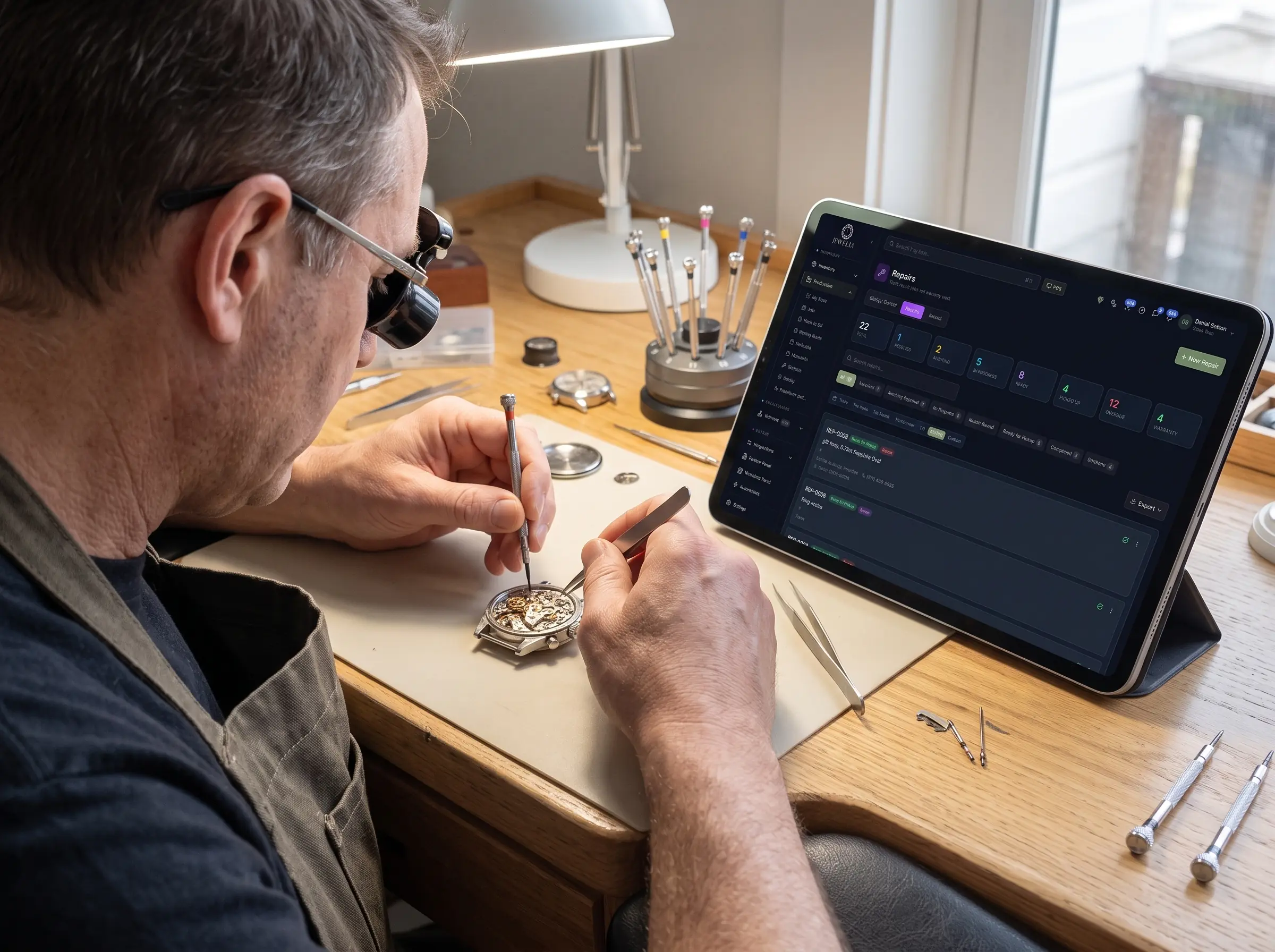
Jewelia for repair & service
A repair is a promise with a date on it
Somebody handed you something they care about and expects it back in a fortnight. Everything a repair business is judged on — trust, turnaround, not losing things — depends on a record that a paper envelope cannot keep. For jewelry service providers — repair benches, watchmakers, stone setters, engravers, appraisers, casters and CAD designers — Jewelia is cloud jewelry repair shop software that tracks every job from intake to delivery, for your own clients and the trade alike.
The envelope in the drawer
What it costs youA handwritten ticket, a piece someone cares about, and no record of what it looked like when it came in.
How Jewelia solves itIntake with before-and-after photos, a barcoded tag and stages you define, so every job is on the board from the moment it arrives.See how
The job that was never charged
What it costs youThe piece went back to the customer, the invoice never went out, and nobody noticed until month end.
How Jewelia solves itEstimates and deposits on intake, and the invoice raised automatically when a piece is marked ready.See how
The status call
What it costs you“Is it ready yet?” — six times a day, each one a walk to the bench and a guess.
How Jewelia solves itA status the whole team can see, and the customer told automatically when it is ready.See how
The dispute you cannot win
What it costs you“That scratch was not there when I brought it in.” Without a photo on the record, it is your word against theirs.
How Jewelia solves itBefore-and-after photos on the job record, timestamped, so the condition at intake is on file.See how
The outwork you lost track of
What it costs youPlating went to one shop, setting to another, and nobody knows which is late until the customer calls.
How Jewelia solves itOutwork stages assigned to a named setter, engraver or caster with a due date, so work you send out is tracked as closely as work you take in.See how
Taken in properly
The piece, the fault, the quote and the promised date captured at the counter, with before photos and a barcoded tag printed on the spot.
Before and after, on the record
Photographs attached to the job rather than sitting in someone's phone — which is what settles a conversation about a mark that was already there.
The phone stops ringing
Automatic client notifications when a job changes stage, so “is it ready yet?” is answered before it is asked.
Every job gets billed
Estimates and deposits at intake, and the invoice raised automatically when a piece is marked ready — so nothing goes back to a customer unpaid.
Four ways a repair shop bleeds
None of them show up as a line on the accounts. They show up as a month that was busy and somehow did not make any money.
The envelope in the drawer
A paper ticket has no owner, no due date and no history. It falls between benches, and the first anyone knows is the customer standing at the counter asking for a piece nobody can find.
The job that was never charged
Small amounts, constantly. A stone replaced, an extra hour, a rhodium that was not on the estimate — added at the bench, never added to the bill, and gone by the time anyone reconciles.
The status call
Every “is it ready?” costs a few minutes of somebody walking to a bench. Across a week that is a day of skilled labour spent on a question a notification would have answered.
The dispute you cannot win
Without a photograph at intake, a scratch that arrived with the piece and a scratch that arrived in your workshop look exactly the same — and the customer is remembering it better than you are.
Six steps, and none of them on paper
1Intake
Item, service type, fault, quote and promised date, with before photos and a barcoded tag printed at the counter.
2Estimate
Quote the work, take a deposit if you want one, and get approval before anything is started.
3At the bench
Assigned to a person, moving through stages you define, with time and materials recorded as the work happens.
4Out and back
Send plating, engraving or setting to an outside bench and keep the job on your board with a due date against it.
5Ready
Mark it ready and the invoice raises itself; the client is notified without anybody making a call.
6Collected
After photos on the record, the job closed, and the whole history sitting on the client for next time.
Trade work, kept as tidy as retail
Work from other jewelers usually arrives as a bag, a note and a phone call. Track it like any other job, against the store that sent it, and bill it the moment it is ready.
Trade clients as accounts
Stores that send you work get their own account, with every job, invoice and balance on it rather than scattered across envelopes.
Due dates you can keep
Each trade job carries the date you promised the store, and overdue work shows on the board before anyone has to chase it.
The job arrives with its file
Specs, photos and any CAD come attached, so a trade job starts with the information rather than with three clarifying emails.
Your own outwork, tracked
When you send plating or setting on to somebody else, that stage stays on your board with a due date instead of disappearing.

“Service provider” covers a lot of trades
They have different skills and the same operational problem: work arriving from several directions, each piece belonging to somebody who wants it back.
Repair benches
Sizings, retips, clasps, shank work, restringing and restoration — the volume work that pays the rent and is hardest to keep track of.
Watchmakers
Service intervals, movement work, parts on order and warranty jobs, each with its own timeline and its own customer waiting.
Stone setters
Work arriving from retailers and manufacturers, with the piece, the stones and the instructions on one ticket rather than in an email.
Engravers
Short-turnaround jobs where the proof matters — what was asked for, what was approved, and what went on the piece.
Appraisers
Insurance, sale and estate valuations recorded against the client and the item, printable and linked to the piece.
Casters & CAD designers
Trade work for workshops that do not cast or model in-house, tracked as jobs with files attached rather than as a series of emails.
The piece, the client and the bill are one record
Production & Repairs
The job board, stages, photos, tags, QC and outwork — the core of the workflow.
Clients & invoicing
Estimates, deposits, invoices and the full service history on every client record.
Planner
Appointments, pickups and follow-ups as tasks with an owner and a due date.
Point of Sale
Ring up the pickup at the counter against the same client record.
Inventory
Findings, stones and materials consumed by a job, drawn from stock rather than estimated.
Analytics
Turnaround, throughput and what each kind of job actually costs you in bench time.
One bench or twenty
A sole trader gets the same intake, tagging, photos and notifications a larger workshop does. The difference is seats and how many jobs are open at once.
Starter
A one-person bench
$179/month
$149/month billed annually
- 1 seat
- 25 active jobs
- Barcoded repair tags
- Estimates, invoicing & planner
- 11 essential reports
Professional
A shop with a team
$399/month
$333/month billed annually
- 5 seats, role-based permissions
- 250 active jobs
- Jewelia AI — 250 credits/mo
- Partner Portal — 10 partners
- 29 reports + custom builder
Enterprise
A trade workshop at volume
$999/month
$833/month billed annually
- 10 seats, audit logging
- 2,500 active jobs
- Point of Sale included
- Partner Portal — 50 partners
- All reports & API access
Jewelry repair shop software: questions
What is jewelry repair shop software?
Jewelry repair shop software tracks a repair from the moment it crosses the counter to the moment the customer collects it: what came in, what was wrong with it, what was quoted, who is working on it, what has actually been done, what it cost in materials and bench time, and whether it is ready. It replaces the paper envelope in a drawer, which is how repairs get lost, under-charged and remembered only when the customer rings.
Does it work for a one-person bench?
Yes. Starter is a single seat at $179/month and includes production and job tracking, customer records, estimates and invoicing, the Planner and reports. Nothing about it assumes a team — a sole trader gets the same intake, tagging, photo documentation and notifications a larger shop does.
Can I print barcoded repair tags?
Yes. Barcoded tags print from intake on every plan, so the physical piece and the digital job stay connected and anyone at the bench can scan rather than read a job number off a label.
Can I photograph a piece at intake?
Yes, and for a repair business it is the single most useful habit the software enforces. Before and after photos attach to the job record, so a dispute about a mark that was already on the piece has an answer rather than two recollections.
Are customers notified automatically?
Yes. Automatic client notifications go out when a job changes to the stages you choose — received, in progress, ready for pickup — which removes most of the status calls a repair shop fields every day. A self-serve portal where a customer logs in to check for themselves is on the roadmap rather than shipped.
Does the invoice get raised automatically?
Yes. Mark the piece ready and the invoice is raised for you, with the materials and charges added during the job already on it. That is how a repair shop stops leaking small amounts of money on work that was done but never billed.
Can retailers send me jobs through Jewelia?
Yes. Retailers, wholesalers and manufacturers on Jewelia can message you with the piece attached, and outwork stages in their own production module can be assigned to you — so a trade job arrives with its specifications, photos and any CAD files rather than as a description in an email.
Can I send work on to an outside plater or setter?
Yes. Any stage can go to a vendor and is tracked like any other step, with its own due date and its own view. A job at somebody else's bench stays on your board rather than disappearing until you remember to chase it.
Does it handle appraisals?
Yes. Insurance, sale and estate valuations are recorded on the client record and linked to the piece, and they print. An appraisal sits alongside the repair history for the same customer rather than in a separate folder.
Can I see what each kind of job actually costs me?
Yes, once the work is recorded. Time goes against stages as the bench works, materials are drawn against the job, and the reporting shows turnaround and throughput by job type. Most benches discover they are under-charging for exactly the work they do most.
How many jobs can I have open at once?
Starter includes 25 active jobs, Professional 250 and Enterprise 2,500. The limit is on jobs open at one time rather than on how many you complete.
Put your bench on one board.
30-day money-back guarantee. Cancel any month, no setup fees.