
Jewelry store software that runs the counter and the back room.
Ring up the sale, take the trade-in, book the repair and keep every client’s history, sizes and occasions on one record — without juggling five tools that each know a quarter of the story.

Jewelia for retail jewelers
One database, or four versions of the truth
A jewelry store is not one business. It is a shop, a workshop, a lending library of goods you don’t own and a client book going back decades — and every one of those touches the same piece, the same person and the same money. For jewelry retailers, Jewelia is cloud jewelry store management software that puts the counter, the client book, the repair bench and the stockroom on one database, in a browser on an iPad, Mac or PC, with no server to maintain.
The counter and the back room disagree
What it costs youThe stock number on screen is not the stock in the case. Sales, repairs and special orders get re-typed into separate systems, and someone reconciles them at month end.
How Jewelia solves itOne database. A sale, a repair intake and a special order all write to the same item, client and money records, so nothing is entered twice.See how
A register that doesn't know jewelry
What it costs youA generic POS takes the card but cannot weigh a trade-in, price it on today's gold, net it off the ticket or hold a layaway balance.
How Jewelia solves itPoint of sale built for the trade: Stripe Terminal payments, inline trade-in appraisal, a metal calculator on your own rates, layaway and instant commission.See how
Repairs get lost
What it costs youA bracelet in an envelope with a handwritten ticket. Nobody knows its status, the customer phones to ask, and the bench finds out about the promise date the day it is due.
How Jewelia solves itIntake with a quote and a barcoded tag, photos along the way, a status the whole team can see, and the customer told automatically when it is ready.See how
Goods on memo mixed in with stock you own
What it costs youSupplier pieces sit in the case beside your own inventory. Your valuation is wrong, and who owes what to whom lives in two spreadsheets that disagree.
How Jewelia solves itMemo in tracked separately from owned stock, with terms, aging and a shared Ledger the supplier can open from a link.See how
The client book is in someone's head
What it costs youRing sizes, anniversaries and purchase history walk out the door when the salesperson does. A returning client is greeted by whoever is on shift.
How Jewelia solves itOne client record with purchase history, sizes, dates and wishlists, so the business remembers the person even when the team changes.See how
A server in the back office
What it costs youWindows workstations, a SQL box under the desk, backups nobody checks, and no way to look at the numbers from home on a Sunday night.
How Jewelia solves itRuns in a browser on the iPad at the counter, the Mac in the office and a laptop at home. Nothing to install, patch or back up yourself.See how
The counter and the back room agree
A sale, a repair intake and a special order all write to the same records, so nobody re-types anything and the stock number on the screen is the stock in the case.
You remember every client
Purchase history, ring sizes, anniversaries and wishlists on one record — so the person who walks back in is greeted by a business that knows them, not by whoever is on shift.
Repairs stop getting lost
Intake with a quote and a barcoded tag, photos along the way, a status the whole team can see, and the customer told automatically when it is ready.
No server in the back office
It runs in a browser on the iPad at the counter, the Mac in the office and a laptop at home on a Sunday night. Nothing to install, patch or back up yourself.
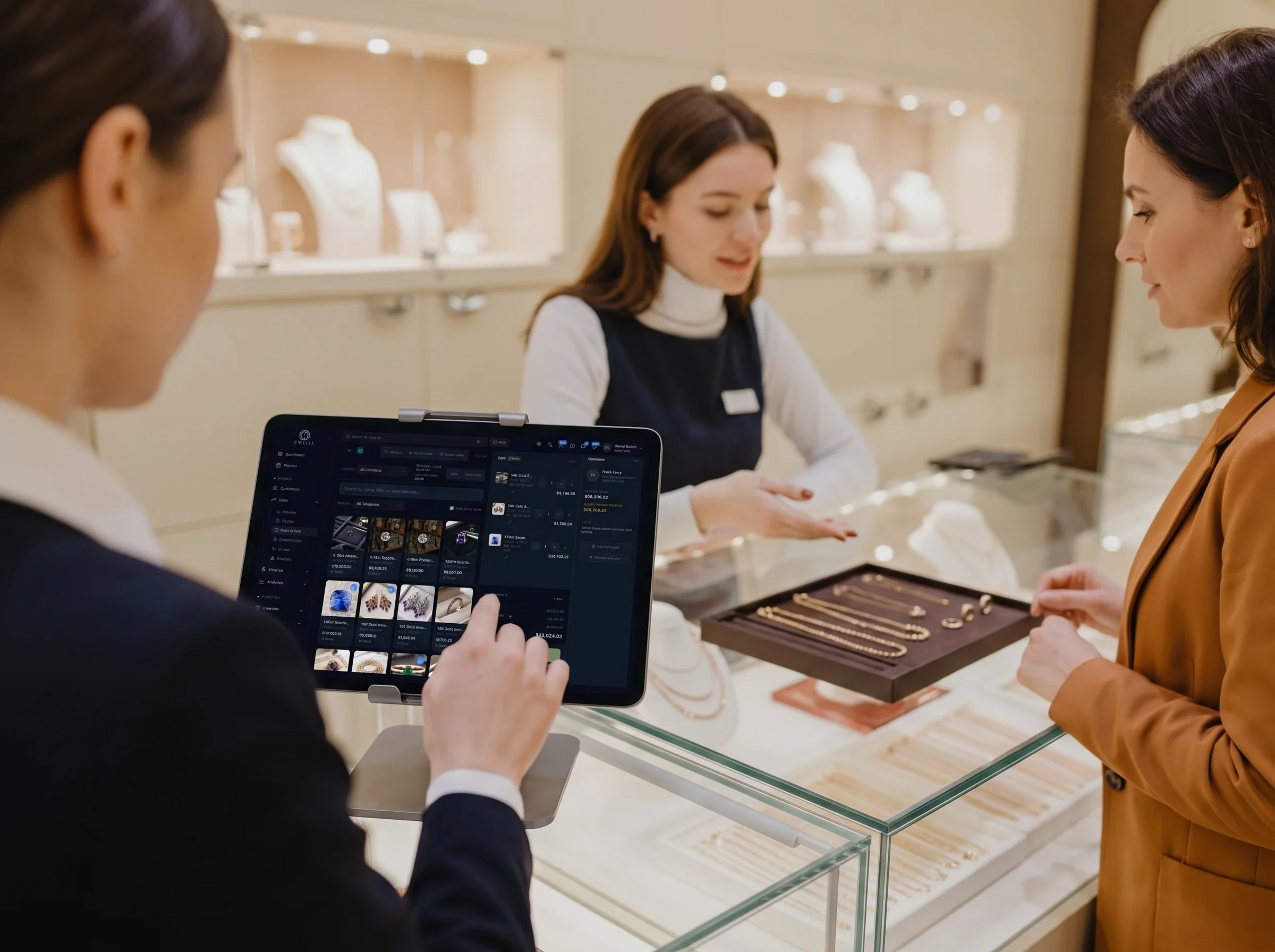
The customer gets handed over. The context goes with them.
In a real store a customer is rarely served by one person from start to finish. Someone greets them, someone else knows the stone, and the sale is closed by whoever is free. When the history lives in one person’s head, the handoff costs you the sale.
- Every team member sees the same client record and the same stock
- Park a sale and let a colleague resume it with the cart intact
- Seats are included in the plan, not charged per person
Five moments a jewelry store lives or dies on
Software for jewelry stores is judged on ordinary days, not on feature lists. This is what the ordinary day looks like when the systems agree with each other.
- 19:40
a repair comes in
A customer brings in a bracelet with a broken clasp. You take it in with a quote, photograph it, print a barcoded tag and hand her a receipt. It is on the workshop board before she reaches the door, and she gets a message when it is ready rather than a phone call asking.
- 211:15
a returning client
He bought a pendant two years ago. The record shows what he bought, his partner's ring size, their anniversary in April and the tennis bracelet he mentioned in June. The conversation starts three steps in rather than from scratch.
- 31:30
a trade-in
She wants the new ring and has an old one to put toward it. You appraise it on the same screen as the sale, priced on the metal rates you set yourself, and the overflow becomes store credit rather than cash out the door.
- 43:00
a special order
The piece is not in the case. You quote it from a connected supplier's shared stock, take a deposit, and the balance sits on the customer record where anyone serving her next can see it.
- 55:20
the day adds up
Takings, margin, commission and what moved are already on the dashboard. Nothing to reconcile, no end-of-day export, and the repairs still open are on one screen before you lock the door.
Six modules, one set of records
Point of sale
Stripe Terminal card payments, inline trade-in appraisal, metal calculator on your own rates, parked sales, layaway and deposits, instant commission on the ticket.
Clients & clienteling
Purchase history, ring sizes, occasions with reminders, wishlists, store credit, and follow-ups that are assigned to a person rather than hoped for.
Repairs & custom jobs
Intake to pickup with quotes, photos, barcoded tags, outside repairers, automatic invoicing when ready and notifications to the customer.
Inventory
Metal and stone fields, GIA lookup, barcode scan to sell or count, and locations down to the display case or safe.
Memo in
Goods held on memo from your suppliers, tracked separately from stock you own so your valuation stays honest while the pieces stay sellable.
Reports
Over 40 built-in reports — sales by period, top customers, inventory value and turnover, returns and exchanges, replacement valuation at today's metal spot.
The whole store, before your first coffee.
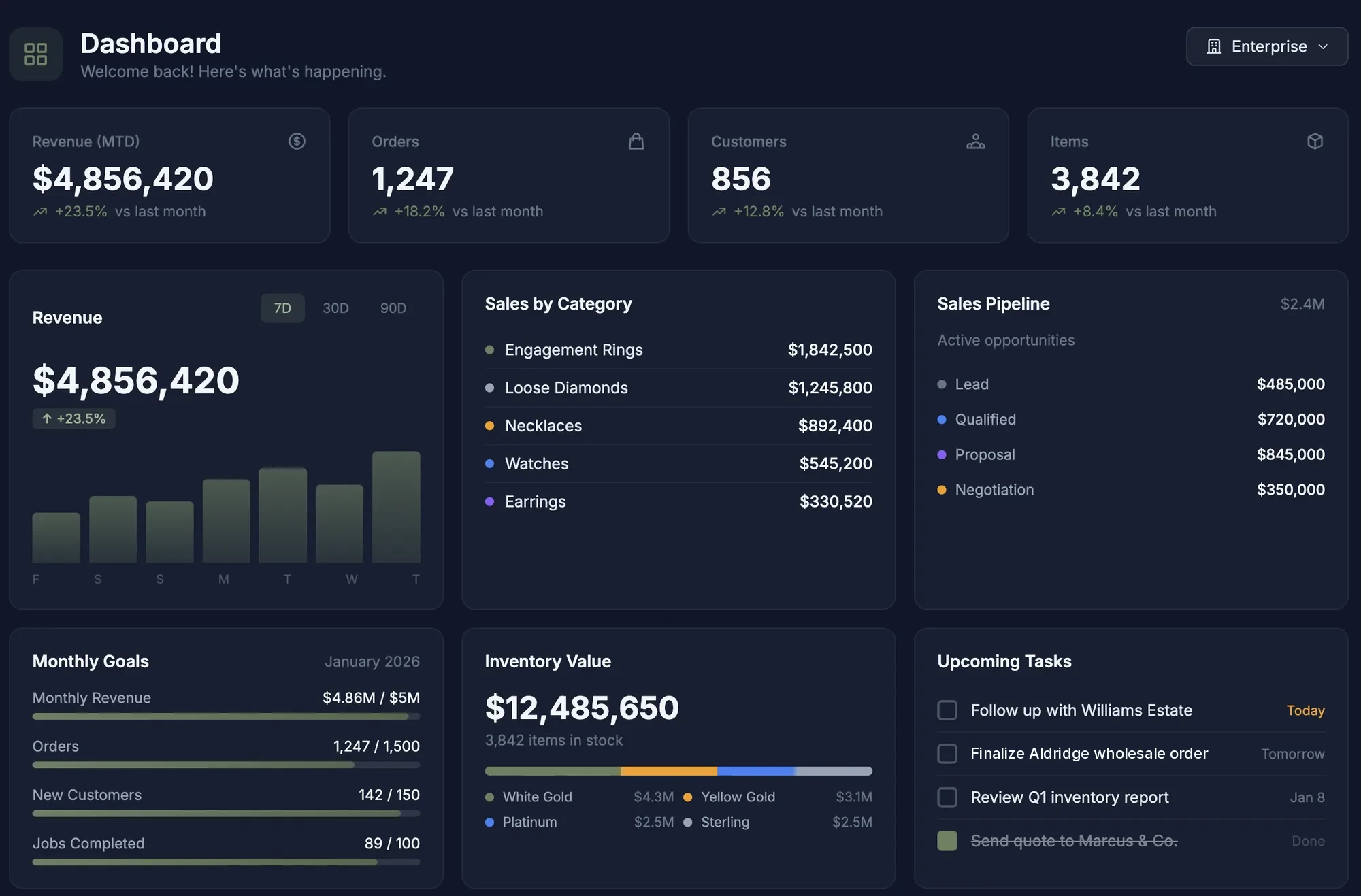
Revenue against your monthly goal, what sold by category, the value sitting in the case broken down by metal, the pipeline of pieces people are still deciding on, and the follow-ups due today — on one screen, reading live records rather than last night’s export.
- Revenue, orders, customers and stock count, month to date
- Sales by category — engagement, loose stones, watches
- Inventory value split by metal, so you can see where the cash is
Six things a store outgrows
A register that doesn't know jewelry
It can take the card. It cannot weigh a trade-in, price it on today's gold, net it off the ticket or hold a layaway balance for four months.
A spreadsheet for stock
Workable at 200 pieces, dangerous at 2,000, and useless the moment you need to know which G VS2 rounds you have between 0.90 and 1.20.
Paper envelopes for repairs
The single most common way a jewelry store loses money and goodwill at the same time — an envelope in a drawer with no owner and no date.
A separate CRM nobody updates
Client software that cannot see what people actually bought is a contact list with extra steps, and it goes stale within a season.
An on-premise system and its server
Windows-based systems installed in the back office still run plenty of good stores. They also mean a machine to maintain, backups that are your problem, and a screen you cannot open from home.
Four subscriptions that don't talk
POS here, accounting there, a repair tracker, a spreadsheet — and a person whose actual job is keeping four versions of the truth in sync.
“I can’t face moving twenty years of data”
It is the real reason most stores stay on a system they have stopped liking. So we do the moving, and you see your own goods in it before you commit to anything.
Bring your stock
Import it yourself with the guided wizard, or send us the export from whatever you run today and we will load and clean it as part of onboarding. Both on every plan.
Bring your clients
Customer records, purchase history and balances come across with duplicate detection and merge, so the same client entered twice becomes one record with both histories.
See it on your own goods first
We will load an export of your inventory before you sign, so the demo runs on your pieces rather than on a sample dataset with somebody else's rings in it.
Published, so you can decide before you call
Every plan includes inventory, clients, repairs and the planner. Point of sale is on Enterprise.
Starter
A single store finding its feet
$179/month
$149/month billed annually
- 500 customers, 1,000 items
- Repairs & custom jobs — 25 active
- Memo in from suppliers
- 11 essential reports
- 1 seat
Professional
An established store with a team
$399/month
$333/month billed annually
- 5,000 customers, 10,000 items
- 250 active jobs
- Jewelia AI — 250 credits/mo
- 29 reports + custom builder
- 5 seats, role-based permissions
Enterprise
Multi-location, and the register too
$999/month
$833/month billed annually
- 25,000 customers, 50,000 items
- Stripe Connect online payments
- 2,500 active jobs
- All reports incl. multi-location
- 10 seats, audit logging
Plenty of stores are also something else
If you also wholesale a line, make your own pieces or take in trade work, the same platform covers it — you are not buying a second system.
Jewelry store software: questions
What is the best software for a jewelry store?
It depends on whether you need retail only, or also memo, wholesale and manufacturing. Jewelia covers all of them in one cloud platform with public pricing from $179/month. There are retail-only alternatives that cover the counter and little else. We keep sourced side-by-side comparison pages for each, including where we lose — a store doing nothing but counter sales on Windows machines it already owns may genuinely be better served elsewhere.
What is jewelry store management software?
Software that runs the whole shop rather than one part of it: point of sale at the counter, inventory with metal and stone attributes, client records carrying purchase history and occasions, repair and custom-job tracking from intake to pickup, memo from suppliers, and reporting across all of it. The distinction that matters for a jeweler is that these are one database rather than four systems with integrations between them, because a repair, a trade-in and a special order all touch the same piece, the same client and the same money.
Does Jewelia replace my POS?
Yes. Jewelia POS runs on Stripe Terminal readers and shares one database with inventory and customers, so a sale updates stock, commission and the client record as it is charged. It is included on the Enterprise plan.
Can I use it on an iPad on the shop floor?
Yes. Jewelia is a responsive web application, so the same screens work on an iPad beside the case, a Mac at the back counter and a laptop at home. There is nothing to install from an app store. A native mobile app is in development.
How does it handle repairs?
As jobs on a board. Intake captures the item, repair type, dates and quote and prints a barcoded tag; photos and materials attach as the work happens; the job can go to an outside bench and stay visible; the customer is notified at the stages you choose; and the invoice is raised automatically when the piece is marked ready. For most retail stores this is the module that pays for the subscription on its own.
Can I track trade-ins and scrap gold?
Yes. Trade-ins are appraised inline during the sale using the gold, silver, platinum and palladium rates you set yourself, and any overflow value becomes tracked store credit applied automatically to the next purchase rather than going out as cash.
What about goods my suppliers send me on memo?
Memo in tracks consigned goods separately from stock you own, because they are not your asset until they sell. They stay sellable at the counter, and when one sells the supplier balance moves on a shared ledger you can both open — which is what ends the annual argument about what was actually settled.
Can I run more than one store?
Yes. Locations are defined down to the store, safe or display case, with transfers between them and a full movement audit trail. Starter includes 10 locations, Professional 50 and Enterprise 200, with multi-location performance reporting on Enterprise.
How hard is it to move off my current system?
CSV import is self-serve on every plan and covers stock, clients, orders and more across twenty record types. If you would rather not do it yourself, send us the export from whatever you run today and our team does the mapping and the cleanup as part of onboarding, on every plan. Before you commit, we will load an export of your inventory so you can see your own goods in the system rather than a demo dataset.
Is my data safe in the cloud?
Your records live on managed infrastructure with two-factor authentication, role-based permissions and audit logging on Enterprise — rather than on a PC in the back office that one flood, theft or failed drive can take with it. Backups are ours to run rather than yours to remember.
How much does jewelry store software cost?
Jewelia is $179/month on Starter, $399 on Professional and $999 on Enterprise, with about 17% off on annual billing and no setup fees. Every plan includes inventory, CRM, repairs and the Planner; point of sale is on Enterprise. Publishing the price is deliberate — much of this category still quotes only after a sales call.
See your own store in it first.
30-day money-back guarantee. Cancel any month, no setup fees.