
Know what a piece actually costs you.
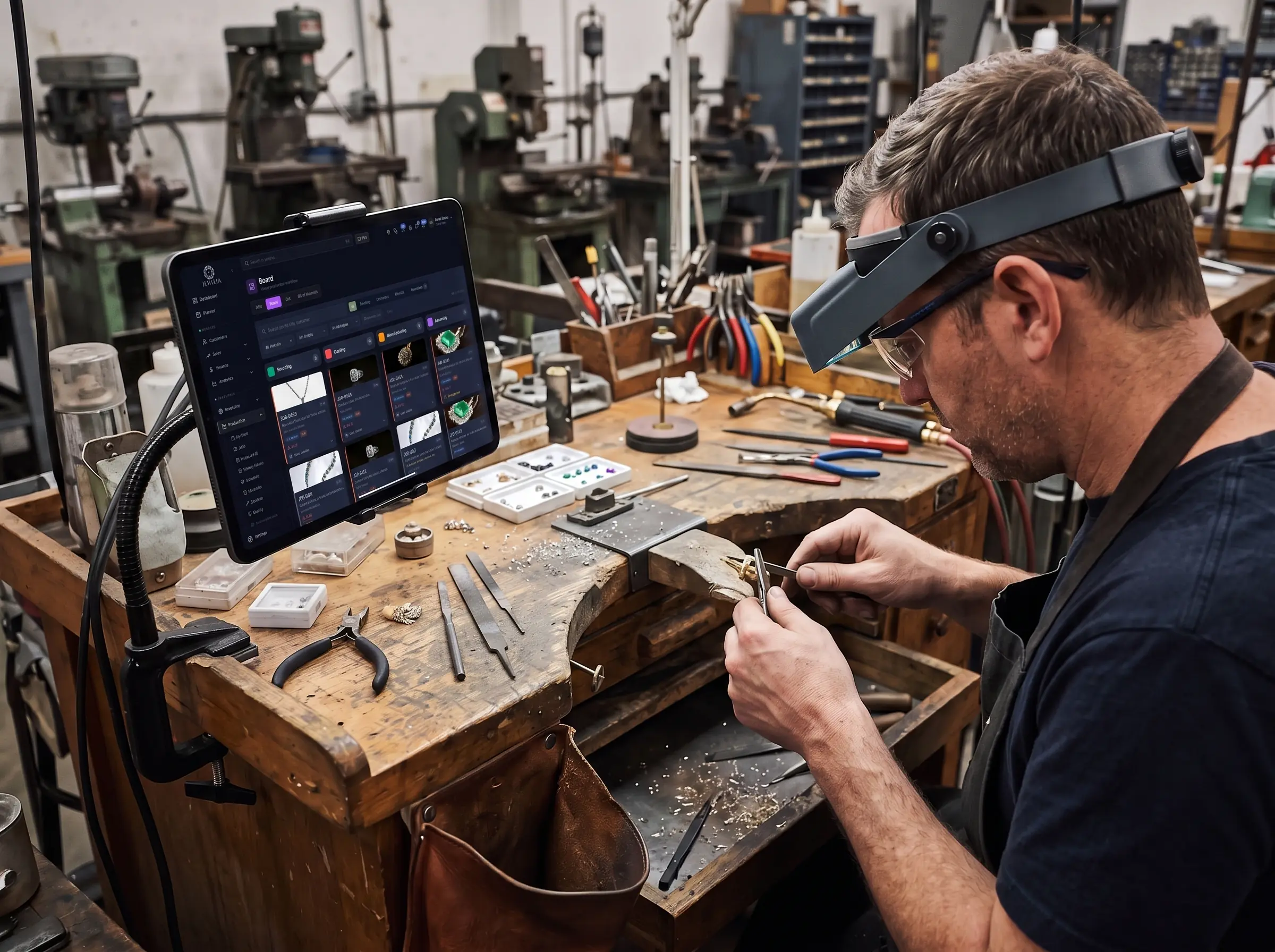
Jewelry manufacturing software that runs every custom order and production run as a job through your own stages — assigned to a bench, timed per stage, costed against a bill of materials, with CAD files and outwork on the same ticket.
Jewelia for manufacturers
One custom ring and a 200-piece run, on the same benches
General manufacturing software assumes every unit is the same. A jewelry workshop runs one-off custom pieces and production runs — chains, findings, a line for a stockist — through the same benches, in precious metal that has a spot price and stones that are not interchangeable. For jewelry manufacturers, Jewelia is cloud jewelry manufacturing software that runs every job through production stages you configure, on a kanban board and a production calendar, with the wholesale side on the same platform.
“Where is job 214?”
What it costs youThe answer is a walk around the benches. The customer is on the phone and the promise date was yesterday.
How Jewelia solves itEvery job on a kanban board through stages you configure — intake, CAD, approval, casting, setting, finishing, QC, delivery — with a status the whole shop can see.See how
“What did that piece actually cost us?”
What it costs youMetal at spot, stones that are not substitutable, and bench hours nobody wrote down. The quote was a feeling.
How Jewelia solves itA bill of materials draws metal, findings and stones from stock as a run consumes them, with time recorded per stage per jeweler.See how
“Where did the week go?”
What it costs youCapacity is promised on instinct. A 200-piece order lands on the same benches as a single custom ring and both slip.
How Jewelia solves itA production calendar and stage timings, so you see capacity before you promise a date, not after you miss one.See how
“Is it coming back from the caster?”
What it costs youOutwork is a void. Pieces leave for casting or setting and nobody tracks the return until it is late.
How Jewelia solves itOutwork tracked as a stage with the outside jeweler, the due date and the return, on the same job record.See how
Wholesale on a different system
What it costs youThe workshop runs on one tool and goods out to stockists run on another. The two never agree on what was sent or paid.
How Jewelia solves itMemo out to retailers and a netted Ledger per account on the same platform as production.See how
Your stages, not a template
Intake, CAD, approval, casting, assembly, setting, finishing, QC, delivery — renamed and reordered to match how your shop actually runs, with a job able to sit in more than one at once.
Capacity before you promise
Assign by bench and see the production calendar before quoting a date, rather than finding out you were over-committed the week the order is due.
The real cost of a piece
Time recorded per stage and materials drawn against a bill of materials, so the next quote is built from what the last one actually took.
Outwork stops being a void
Stages sent to an outside caster or setter are tracked like any other step, with a due date against them — so a job at someone else's bench is still on your board.
From CAD to delivery, every job visible
These are the defaults. Rename them, reorder them, switch off the ones you don’t use — and let a job sit in two at once when the work genuinely runs in parallel.

Things a whiteboard cannot tell you
Every workshop can answer these eventually. The question is whether it takes a screen or an afternoon.
“Where is job 214?”
A whiteboard tells you a job exists. It does not tell you which stage it is stuck in, who has it, how long it has been there, or whether the stone ever arrived — so the answer costs somebody twenty minutes of walking around.
“What did that piece actually cost us?”
Without time per stage and materials per job, every quote is a guess dressed up as a price. Shops usually discover they are losing money on exactly the work they think of as their speciality.
“Where did the week go?”
Throughput feels like a mood rather than a number. Stage timings across many jobs show where work genuinely queues — and it is rarely the stage everybody blames.
“Is it coming back from the caster?”
Work sent outside the shop disappears from every system you own. A job at an outside bench with no due date attached to it is a delivery promise nobody is tracking.
The piece that comes back costs you twice.
Rework is the most expensive thing a workshop does and the least measured — the bench time is spent again, the metal is spent again, and the delivery date moves. Recording QC where the issue is found is what turns that from a bad week into a number you can act on.
- QC checklists with the issue documented, not just a pass or fail
- Rework tracked per job and per stage, so patterns surface
- Time and materials spent twice are both visible in the cost

Everything a workshop runs on
Kanban job board
Every job by stage, filtered by status, priority, metal, assignee or overdue-only — drag to move or reassign.
Production calendar
Schedule by bench and due date so capacity is something you see rather than something you discover.
CAD & renders on the job
Attach CAD files, renders and reference images, and send them to the customer for approval before anything is cast.
Bill of materials
Metal, stones and findings per finished piece, drawn against inventory as the job consumes them.
Weekly Hours
Time recorded against jobs and stages and aggregated by week — the raw material for real costing.
Quality control
Checklists, documented issues and rework tracked per job and per bench, so a piece does not go out wrong twice.
Out & outwork
Send casting, setting or plating to a vendor and track it as a stage with its own due date and its own view.
Equipment records
Casting machines, lasers and benches with maintenance history and booking, so downtime is planned.
You make it. Then you have to place it.
Almost every manufacturer is also a wholesaler — finished goods go out to stockists, on memo, against terms, and somebody has to know what is where and who owes what. Buying a second system for that half is how the two halves stop agreeing.
- Memo out to your stockistsFinished goods placed with retailers on memo, with terms, due dates, aging and partial returns tracked line by line.
- A shared ledger per accountOne netted balance per retailer, with an optional live statement link you can send them instead of two spreadsheets that disagree. Sharing is per account and entirely your call.
- Customer-specific pricingPrice tiers by account, applied automatically to quotes and memos.
- A portal for your stockistsGive the retailers you choose a read-only Partner Portal view of your line, so reorders start from what you actually have.
The job, the metal and the money are one record
Production & Repairs
The board, the stages, bench assignment, QC and outwork — the core of the manufacturing workflow.
Inventory
A bill of materials draws metal, findings and stones from stock as a run consumes them.
Analytics
Throughput, stage timings, rework and cost per piece — reporting rather than an impression of the month.
Memo & Ledger
The wholesale side: goods out to stockists, aging, and a netted balance per account.
Sales & CRM
Retail accounts, quotes and custom orders, with every job tied to the customer who ordered it.
Planner
Stages become assigned tasks with due dates in the list each bench opens every morning.
From one bench to a production floor
The limit is on jobs open at one time. A single goldsmith and a factory running hundreds of pieces are on the same application, not different products.
Jewelry manufacturing software: questions
What is jewelry manufacturing software?
Jewelry manufacturing software runs production as jobs moving through defined stages — intake, CAD and design, approval, casting, assembly, setting, finishing, quality control and delivery — with each stage assigned to a bench, time recorded against it, and materials drawn against a bill of materials. It differs from general manufacturing or MRP software in what it has to model: one-off custom pieces alongside batch runs, precious metal and stones as consumables with real value, CAD approval before casting, and work routinely sent to outside casters and setters.
Is Jewelia an ERP for jewelry manufacturers?
It covers the parts most workshops actually need — production stages, bench scheduling, materials and bill of materials, QC, wholesale memo and invoicing, and reporting — in a cloud product from $179/month with no server to maintain. If you need MES-level machine scheduling or full GAAP financials inside the same system, a traditional jewelry ERP such as Luxare or e-Jewelry on Dynamics may fit better, and our comparison pages say so. Most workshops under a few hundred jobs a month do not need that, and pay a great deal for it when they buy it.
Can I customise the production stages?
Yes. The nine default stages are a starting point rather than a constraint — shops name and order their own, switch off the ones they do not use, and a job can sit in more than one stage at once when work genuinely runs in parallel.
Can I attach CAD files and renders?
Yes. CAD files, renders and reference images attach to the job and can be sent to the customer for approval before anything is cast, which is the cheapest place in the whole process to catch a misunderstanding.
How does job costing work?
Two inputs. Time is recorded per stage as the bench works and aggregated in Weekly Hours; materials are drawn against a bill of materials that lists the metal, stones and findings a piece consumes. Between them you can cost a finished job on what it actually took rather than on what you have always charged for that kind of work.
Can I track work sent to outside casters or setters?
Yes. Any stage can be assigned to a vendor and is tracked like any other step, with its own due date and its own Out view. A job at an outside bench stays on your board rather than disappearing until somebody remembers to chase it.
Can I see capacity before promising a delivery date?
Yes — that is what the production calendar is for. Work is scheduled by bench and due date, so you can see what a given week already holds before committing to another order rather than finding out afterwards.
Does it handle batch runs as well as one-off custom pieces?
Both, on the same board. A single custom engagement ring and a 200-piece run are the same kind of record with different stages and quantities, which matters because most workshops do both and separating them into two systems is how jobs get lost between them.
What about the wholesale side of the business?
Most manufacturers also place finished goods with retailers. Memo out tracks those with terms, due dates, aging and partial returns, and a netted ledger per account carries a live statement you can send the retailer if you want them to see it. You are not buying a second system for the selling half.
Can I see which bench or which stage is slowing things down?
Yes. Because stages are assigned to people with time recorded against them, throughput, queue time and rework can be read per stage and per bench rather than as one workshop average. The useful finding is usually a handoff rather than a person.
How many jobs can I run?
Starter includes 25 active jobs and 1,000 inventory items, Professional 250 jobs and 10,000 items, Enterprise 2,500 jobs and 50,000 items, and Enterprise Plus is unlimited. The limit is on jobs open at one time.
Put your own jobs on the board.
30-day money-back guarantee. Cancel any month, no setup fees.