
Project management that knows what the job is.
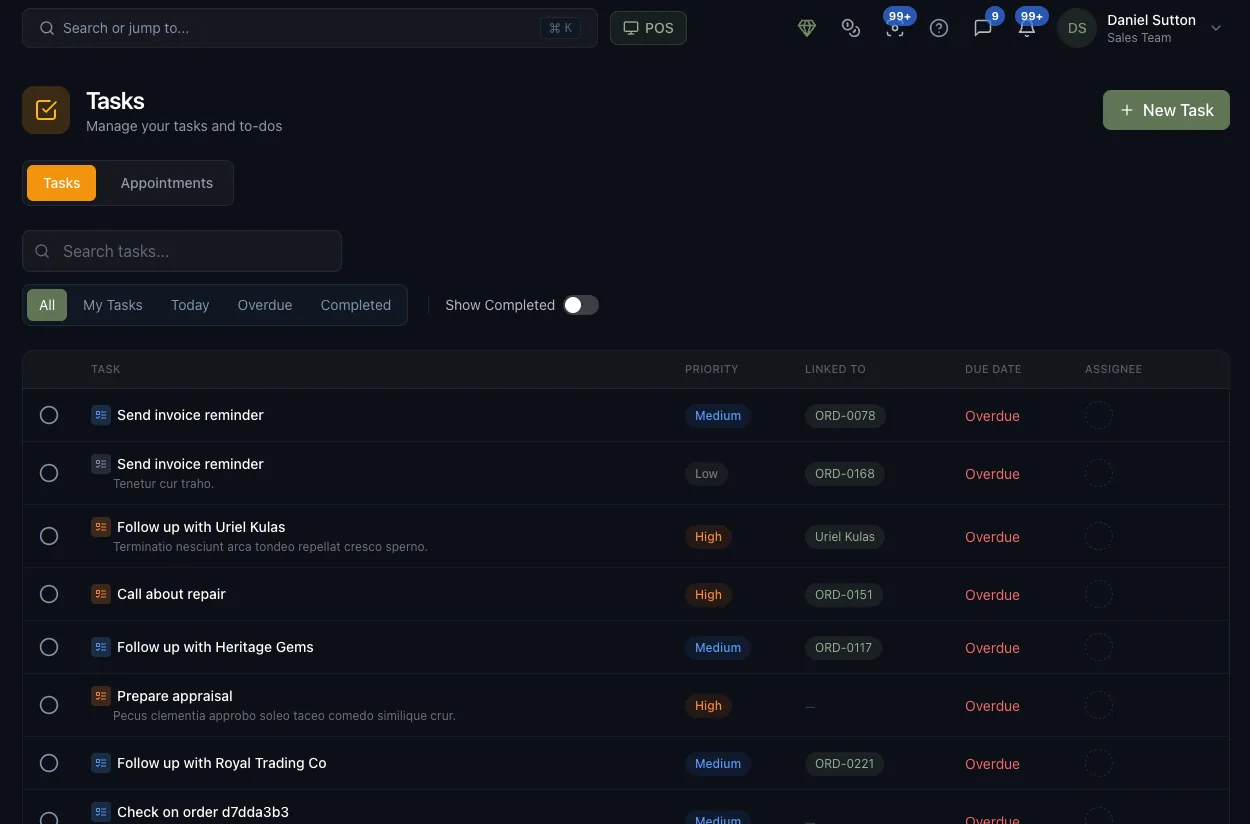
“Send invoice reminder — ORD-0078 — High — Overdue.” Every task carries a priority, a due date, an owner and the record it’s about — so work gets done by a person, not by a group chat.


What is the Jewelia Planner?
The work, the owner and the deadline in one place
Most jewelry businesses do not lose work because nobody cared. They lose it because the promise lived in a head, a notebook or a text message. Jewelia’s Planner is project and task management built into the platform: every task has an owner, a due date and the customer, order, invoice or job it belongs to.
"Someone should call her about the stone"
What it costs youAn intention with no owner, no date and nothing attached. It gets done by whoever remembers, or not at all.
How Jewelia solves itA task with an owner, a due date and a link to the customer, order, invoice or job — six fields and the argument is over.See how
The promise lived in a text message
What it costs youThe pickup date was agreed on WhatsApp with the salesperson who is off on Thursday.
How Jewelia solves itAppointments and pickups on a shared calendar the whole team sees, with the customer record attached.See how
Nobody knows what is overdue
What it costs youThe overdue list is a feeling. The customer finds out before you do.
How Jewelia solves itOverdue tasks surface on the board and the dashboard, and Jewelia AI can reassign them to whoever is free — once you approve.See how
Recurring work that only one person remembers
What it costs youInsurance renewals, memo check-ins, the monthly stock count — done when someone happens to think of it.
How Jewelia solves itRecurring tasks that regenerate themselves on the schedule you set, assigned to the right desk each time.See how
The task board is a separate app
What it costs youTrello for tasks, a calendar for appointments, the business system for everything else. None of them know about each other.
How Jewelia solves itThe Planner reads and writes the same records as POS, production and memo, so a task about job 214 opens job 214.See how
Every task knows its record
Link a to-do to the customer, order, invoice or production job it is about, so the context is one click away instead of one conversation away.
Every task has an owner
Assign it to a person with a priority and a due date. My Tasks is what they open in the morning; nothing sits in a shared inbox hoping to be adopted.
Appointments live beside the work
Appointment scheduling for consultations, pickups and appraisals sits on the same planner as the tasks, with the customer record attached and reminders going out automatically.
The routine runs itself
Recurring tasks handle the daily, weekly and monthly jobs nobody should have to remember — stock counts, statements, follow-ups, showcase checks.
Six fields, and the argument is over.
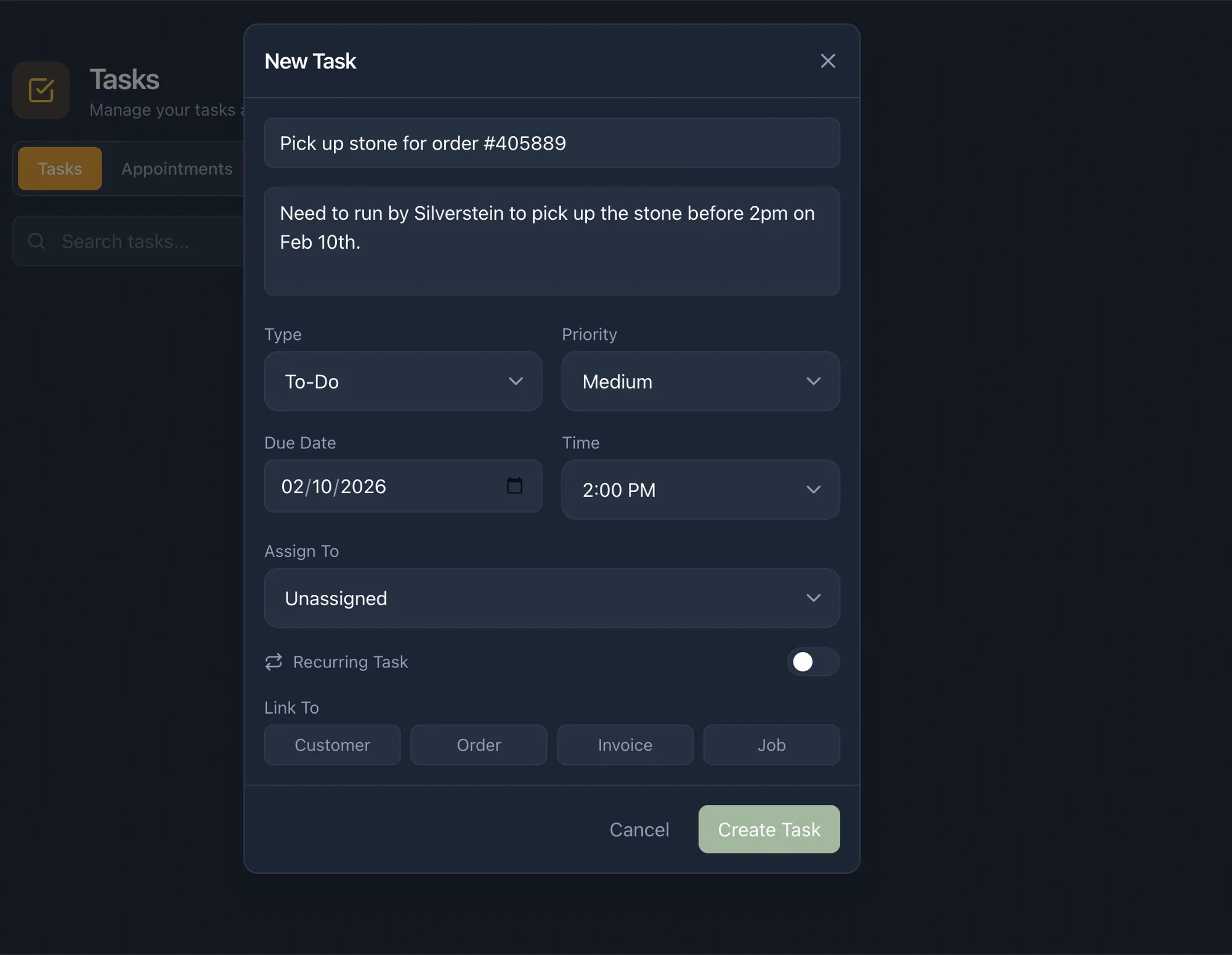
“Someone should call the customer about the stone” is not a task. It has no owner, no date and nothing attached to it. These are the six things that turn an intention into something a jewelry business can actually run on.
- Type
- To-do, call and the other work types, so a list can be filtered by the kind of work rather than read line by line.
- Priority
- High, medium or low — the difference between what has to happen today and what merely should.
- Due date & time
- A deadline, not a wish. Reminders go out before it, and anything past it lands in the Overdue view.
- Assignee
- One name. Work assigned to everybody gets done by nobody, so every task belongs to a person.
- Recurrence
- Daily, weekly, monthly or a custom cadence for the jobs that come back around whether you remember them or not.
- Linked record
- Customer, order, invoice or job — the reason the task exists, attached to the task itself.
Everyone opens a different list
Jewelry task management fails when everyone is handed the same list. An owner, a bench jeweler and a salesperson need three different answers to “what now?”, so the Planner gives each of them a view of their own.
All
Everything open across the business, for whoever is holding the whole picture.
My Tasks
One person's list. The screen a bench jeweler or a salesperson starts the day on.
Today
What is due before close. The shortest useful list in the building.
Overdue
Deliberately hard to ignore. A promised repair that slipped is a customer who is about to call.
Completed
What actually got done, and by whom — the record you look at when a week went wrong.
Why not Asana, Trello or Monday?
Generic project management stops at the description of the work
Those tools are good at what they were built for. A jewelry business just isn’t it — and these are the four places the seams show.
The task and the record are in different apps
In a generic tool, “Chase the setting on ORD-0078” is a line of text. Nobody can see the order, the customer, the stone or the due date from it — so the first thing anyone does is leave the tool and go look. In Jewelia the task is attached to the order itself.
Somebody has to keep it fed
A board only reflects reality while a person is typing into it. Jewelia creates tasks from the work that already happened — an order placed, a repair taken in, a memo sent — so the list keeps up with the shop without a daily data-entry shift.
It has no idea what a jewelry business does
Sprints, epics and burndown charts describe software teams. A jeweler's week is appointments, repairs promised by Friday, a stone being picked up, an invoice that needs chasing and a wax that has to go to casting. The planner should be shaped like that.
It is another subscription and another login
A separate project management tool means another seat per employee, another password, another place to check and another system nobody updates on a busy Saturday. The Planner is included on every Jewelia plan.
A jeweler’s week, as tasks
Workflow management for a jewelry business is not a board of cards. It is a handful of promises with dates on them, each attached to something physical sitting in a safe or on a bench — which is why jewelry workflow software has to hold the piece as well as the task.
A repair promised for Friday
Intake creates the task, it is assigned to the bench, it is linked to the job and the customer, and it appears in Today on Thursday rather than in a phone call on Saturday.
A custom piece with five stages
Design approval, CAD, casting, setting, polish. Each stage is a task with an owner and a date, hanging off the same production job, so “where is it up to” has an answer on the screen.
An invoice nobody chased
“Send invoice reminder — ORD-0078 — High — Overdue.” The task carries the invoice, so chasing it takes one click rather than a hunt through the finance tab.
A client appointment on Saturday
An appraisal booking with the customer record attached, a reminder to them, a reminder to the team, and the follow-up task created the moment it is done.
It fills itself in
The list keeps up with the shop.
Task management software is only worth opening if it is current, and it is only current if maintaining it is somebody’s job — which is exactly the job nobody has time for on a Saturday. So Jewelia generates tasks from the work that already happened: an order placed, a repair taken in, a memo sent out, a balance falling overdue.
Or just ask. Jewelia AI creates and assigns follow-ups from a plain-English request, so a conversation becomes a task with a name and a date on it.
- Production & Repairs Jobs generate the tasks that move them along, and each stage is assigned to the person who does it.
- Sales & CRM Follow-ups, appointments and reminders sit on the customer record they belong to.
- Memo & Ledger Goods due back and balances due for chasing become tasks with dates rather than good intentions.
- Jewelia AI Ask in plain English and the assistant creates and assigns the follow-ups for you.
Jewelry project management: questions
What is jewelry project management software?
Jewelry project management software organises the work a jewelry business owes people — repairs, custom jobs, appointments, follow-ups and invoices to chase — as tasks with owners, priorities and due dates. What separates it from a general project management tool is that every task is attached to the record it concerns: a customer, an order, a production job or an invoice. Jewelia's Planner does this inside the platform that already holds those records, so the task and the work are never in two different systems.
Can the Planner replace Asana, Trello or Monday for a jewelry business?
For most jewelry businesses, yes. Tasks carry a type, a priority, a due date and time, an assignee and optional recurrence, with All, My Tasks, Today, Overdue and Completed views — which covers what a shop floor actually needs. The difference is that a generic tool holds a description of the work while Jewelia holds the work itself, so a task can link to the order, customer, invoice or job it is about. Teams running complex software-style workflows may still prefer a dedicated tool; a jeweler tracking repairs, customs and follow-ups generally does not need one.
Can tasks be created automatically?
Yes. Tasks can be created from orders, repairs and memos, so the work that arrives through the business generates its own follow-ups. Jewelia AI can also create and assign tasks from a plain-English request, which is the fastest way to turn a conversation into something with a name and a date on it.
Can I assign tasks to specific staff members?
Yes. Every task takes a single assignee, and each person has a My Tasks view showing only what is theirs. Because assignment is per task rather than per board, a repair, an appointment follow-up and a stock count can go to three different people without anyone maintaining a project structure.
Does it handle appointments as well as tasks?
Yes. Appointments sit alongside tasks in the Planner — consultations, pickups, appraisals — with the customer record attached and automatic reminders to both the customer and the team. Bookings and to-dos are the same week, so they belong on the same screen.
Can a task be linked to an order, a repair or a customer?
Yes, and this is the main reason to run task management inside your jewelry software rather than beside it. A task links to a customer, order, invoice or production job, so whoever picks it up opens the record from the task instead of searching for it. It also means the record shows what is outstanding against it.
Are there recurring tasks?
Yes — daily, weekly, monthly or a custom cadence. Recurring tasks are how the routine work of a jewelry business stays done: stock counts, supplier statements, showcase checks, follow-up cycles and month-end jobs that would otherwise depend on somebody remembering.
How do I see what is overdue?
The Overdue view collects everything past its due date across the business, and reminders go out before the date arrives. For a jewelry store this is usually the highest-value screen in the system, because an overdue task is almost always a promise made to a customer.
Can staff use it on a phone?
Yes. Jewelia is a cloud platform that runs in a browser, so the Planner is the same on a phone at the bench, an iPad on the floor and a Mac in the office. There is nothing to install and no separate mobile app to keep updated.
Which plan includes the Planner?
Every plan, starting with Starter at $179/month. Task and appointment management is not a paid add-on in Jewelia — it is part of the platform, because work that is not assigned to anyone is the most expensive thing in a jewelry business.
Put a name and a date on every job.
30-day money-back guarantee. Cancel any month, no setup fees.